Using the Highlight Menu
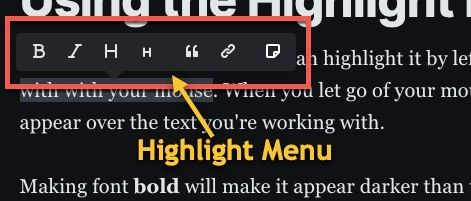
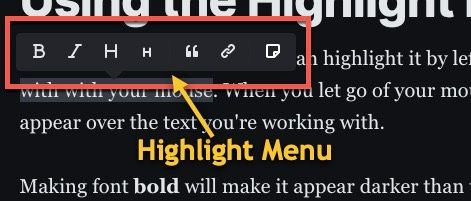
When you add some text, you can highlight it by left clicking and draging across it with with your mouse. When you let go of your mouse, the highlight menu will appear over the text you're working with.
Making font bold will make it appear darker than the surrounding text, or if you're using a dark theme, lighter.
Italicizing can also show emphasis but is more subtle than bold and is less visible with some fonts.
Bold italics are also easy to add. Just click on bold, then italic while the text is selected.
Top Level Heading
Top level headings should be used sparingly and should indicate the main section or topic of your post.
Second Level Heading
Second level headings let you group sub topics.
Headings should be used sparingly as they're interpreted by search engines. A heading used in a strange way could affect your search ranking. Use bold or italics for emphasis, not headings.
A quote will make a whole sentence or paragraph stand out. There will be a bar next to it and it will be italicized. Use a quote to show that you got something from another source. This avoids plagiarism and lets you give credit where it is due.
Four score and seven years ago...
Links are an important element of blogs. They let you send your reader to sites you've referred to or to places where they can get more information on a given topic.
See Ghost Blog tutorials for more!
Snippets let you quickly paste some stored text into your posts. An example may be a tag line or catch phrase you use for your blog. For one of my sites, Linux Literacy, the catch phrase is "The place to learn Linux." This could be an example of something I may want to paste often by making it a snippet.
The place to learn Linux.